
November 2025: Building momentum
November was all about bringing collaboration and personal workflows together. With the core architecture in place, we focused on the systems that make Walling feel like a shared workspace — and the tools that make capturing and organizing ideas fast and intuitive for individuals.
Let's jump right into it.
What we shipped this month
This month, we focused on filling some of the larger gaps in the app:
- Building out workspaces to unlock collaboration, navigation and organization.
- Comments to enhance collaboration.
- Wall sharing and permissions to unlock more granular sharing and access control.
- Walling Inbox to form the foundation for idea and inspiration easy capture and reference.
- Pinned bricks to enable quick and easy access to important bricks.
- Centralized user account management.
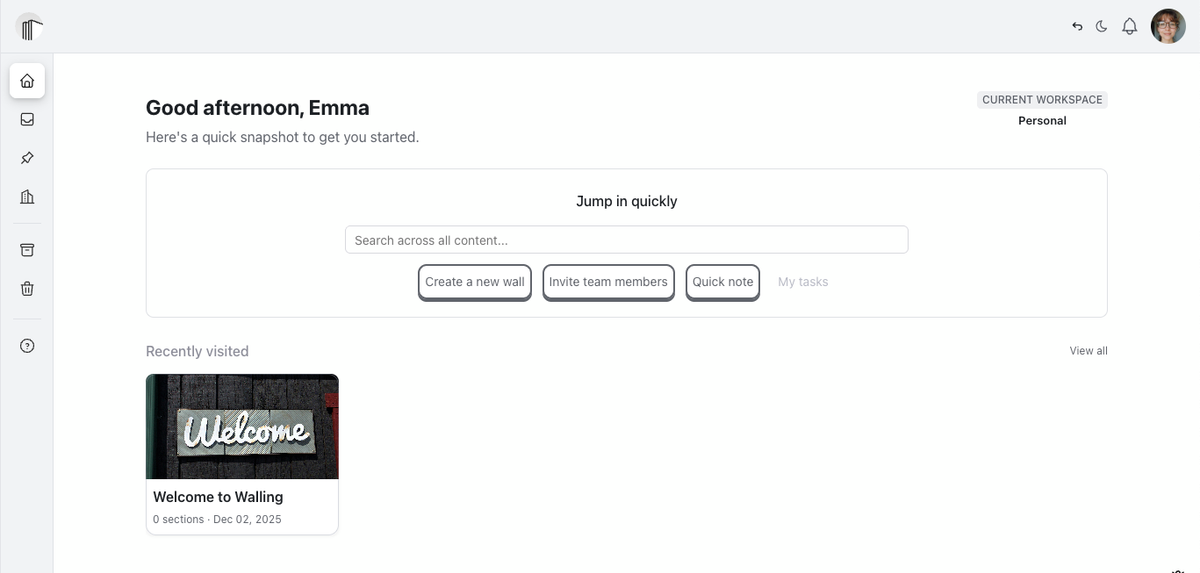
- Improved the home dashboard page with a cleaner, simpler design.
- Improved the navigation sidebar with clear sections for Favorites, Private, and workspace walls and key UX behavior like drag and drop, nesting, collapse/expand, and action menus.
Collaboration foundations
Workspaces
Workspaces give you a dedicated place for collaboration. You can invite teammates, share multiple walls at once, and keep personal work completely separate.
Subscriptions now attach to workspaces (not individuals), and the distinction between “you” and your workspace is clearer and more intuitive.
Settings are centralized and messaging is more direct, so managing a team feels organized and predictable.
Features:
- Workspace management: centralized control of your workspace name, logo, and lifecycle.
- People & access: simple, unified management of team members and roles.
Commenting & discussions
In the new Walling, comments live in clean overlay panels rather than inside your content. This keeps your bricks uncluttered while still supporting rich, contextual discussions. You can collaborate without disrupting the visual clarity of your walls.
Features:
- Wall discussions: wall-level threads for announcements, questions, and broader conversations among all members of a wall.
- Content threads: focused discussions attached directly to content within bricks for deeper collaboration around specific content.
Wall sharing & permissions
Sharing has been rebuilt with clearer, more granular control. You can choose exactly who can view, comment, or edit — whether it’s one person or your entire workspace. Permissions are easier to understand and will soon be enforced consistently across walls, sections, views, and bricks.
Features:
- Sharing with individuals: share a wall directly with selected people and assign the exact access level they need.
- Sharing with all workspace members: grant access to everyone in a workspace with a single action.
Personal workflow features
Workflows in Walling are designed to reduce cognitive load, feel intuitive, and help you stay organized with minimal effort. The focus is on capturing ideas quickly, keeping what matters close at hand, and centralizing settings and content so it’s always easy to find and act on later.
Walling Inbox
The Inbox is a flagship Walling feature: a centralized home for everything you capture. Instead of scattering notes and inspiration across multiple places, everything first goes to your Inbox. You can process, search, and review in one view, then move items to walls for long-term organization. It ensures you always know where new ideas go — and where to find them later.
Features:
- Inbox page: a single place where all captured content lives — both unfiled and filed — with search, filters, and grouping to help you review and organize quickly.
- Quick note: capture ideas, links, images, and thoughts instantly without deciding where they belong.
- Move to wall: send content to the right wall when you’re ready to organize.
Pinned bricks
Pinned bricks give you personal quick access to the things that matter most. Whether it’s a task list, a reference brick, or something you’re actively working on, pinning keeps it close — without needing to reorganize your walls.
- Pinned page: see all your pinned bricks in one convenient place.
- Pin / unpin bricks: mark important items so they’re always within reach.
- Jump to brick location: open the brick on its original wall with one click.
User account management
Account management is now unified and straightforward. Everything related to your identity and security lives in one clear panel, with clean UX and predictable behavior.
- Upload avatar: set or update your profile image.
- Change your name, email and/or password: update all personal details from one place.
- Schedule account for deletion: a clear, reversible flow for closing an account.
An improved navigational experience
Navigation Sidebar
Your sidebar is the backbone of how you browse, structure, and access your work. The new design creates a clear separation between private and workspace content while giving you complete control of organization through collections and multi-level structure.
Features:
- Favorites, Private, and Workspace sections
- Nested collections and walls
- Drag and drop re-ordering
- Clear separation between access scopes (private and workspace)

Home Dashboard v1
The Home dashboard is your lightweight hub for starting your day. It gives you quick access to what matters most: search, recent walls, and fast actions.
Features:
- A workspace indicator for quicker reference of the active workspace
- Global search to quickly find content you're looking for
- Quick actions
- Recently visited walls to more easily jump back into active walls
System Refinements
As major features landed, we spent time improving the connective tissue across the app — the details that make the experience feel cohesive and intentional.
- Visual and behavioral consistency across components
- Modals and page structures
- Architectural separation and reliability
- General polish and cleanup
These subtle improvements compound to make the product feel sharper.
Our focus for December
This month we’ll focus on:
- Hardening wall and workspace permissions end-to-end
- Beginning task management: assignments, due dates, and reminders
- Internal testing, bug fixing and UX polishes in common workflows
Challenges we're facing
As we stitch more features together, we continue to discover better approaches to certain systems. This often means refactoring code that technically “works,” but isn’t the long-term solution we want. Balancing forward momentum with smart rewrites is a constant challenge — but it’s essential to building a stable, scalable foundation.
One example from this past month:
We refactored how modals work across the app. We realized we needed a consistent, centralized modal provider so all confirmation dialogs and interaction patterns behave the same way. Implementing a standardized approach meant designing a new modal provider architecture, then going back through every existing modal to update each call site. It slowed us down in the short term, but the result is cleaner UX, more predictable behavior, and a system we can rely on as the product grows.
This kind of work doesn’t always show up as visible features, but it makes the product better and more resilient over time.
Thanks for following along
Everything is starting to take shape, and we’re excited to keep sharing progress as we move closer to beta. See you next month.
— The Walling Team